Meshtastic Network Status
Recent node count seen on the Southern Tier Meshtastic network.

Details and info about the Southern Tier Meshtastic network.
Recent node count seen on the Southern Tier Meshtastic network.
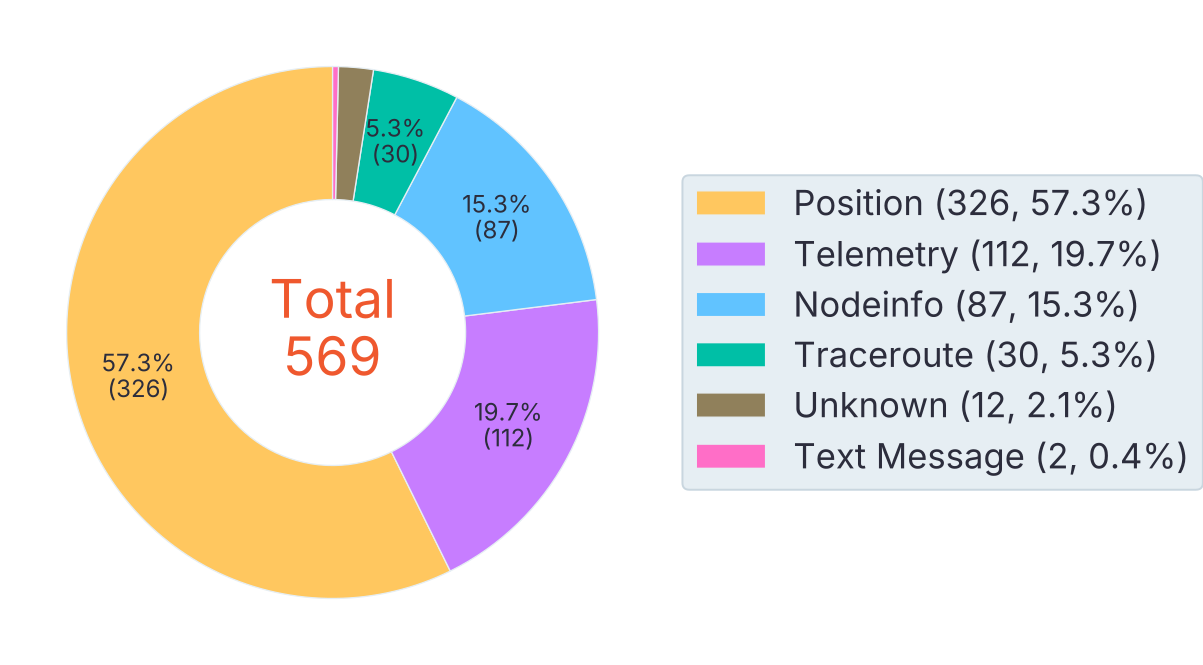
Packets sent and received on the mesh in the past hour.
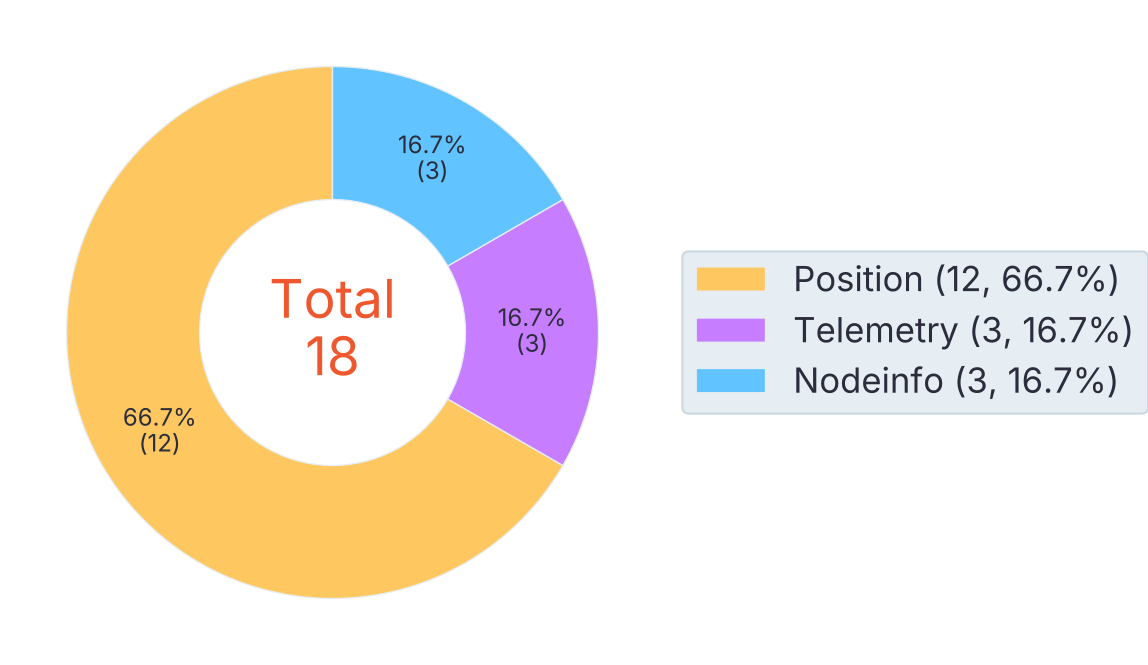
Packets sent and received on the mesh in the past 24 hours.
Meshtastic devices can be configured with different firmware roles that affect how they operate within the mesh.
When in doubt select CLIENT
The standard CLIENT role participates fully in the mesh. It sends and receives messages and forwards packets to help extend coverage.
This is the default role for most portable or battery-powered devices. Use CLIENT for nodes that should actively support the network.
CLIENT_MUTE is like a regular CLIENT, but it doesn’t forward or route messages. It only sends and receives its own traffic, which helps reduce congestion in busy networks.
CLIENT_BASE works like CLIENT but gives priority to rebroadcasting messages to and from your favorited nodes.
It’s perfect for a strong, well-placed “base station” device—like in an attic or on a roof—that supports nearby nodes.
ROUTER is meant for devices that primarily handle routing messages for the mesh. These should be stationary devices placed in strategic locations to act as unofficial hubs.
Routers prioritize relaying messages from other nodes, cutting in line before standard clients rebroadcast, which makes them essential for extending network range and reliability.
ROUTER_LATE is a variant of the ROUTER role, designed for devices that may have limited power or connectivity.
These nodes will attempt to rebroadcast messages even when they are not fully connected to the mesh, making them useful in scenarios where maintaining communication is critical.
When choosing locations for ROUTER or ROUTER_LATE nodes, think in terms of maximum coverage—like a tower on a mountain peak rather than just a tall building.
Assigning a device to one of these roles makes it the preferred rebroadcast point for its direct neighbors, so placement has a big impact on how far and reliably messages travel.
Tools like line-of-sight viewshed surveys can help, but the best locations usually come from testing the mesh in the real world and seeing what actually works.
Below are the local settings for the Meshtastic network in our region.
These are based on USA preset.
Hops refer to the number of intermediate devices a message travels through in the mesh network before reaching its destination.
While the recommended default hop count is 3, we have found that increasing this to ~5 works better given our current coverage.